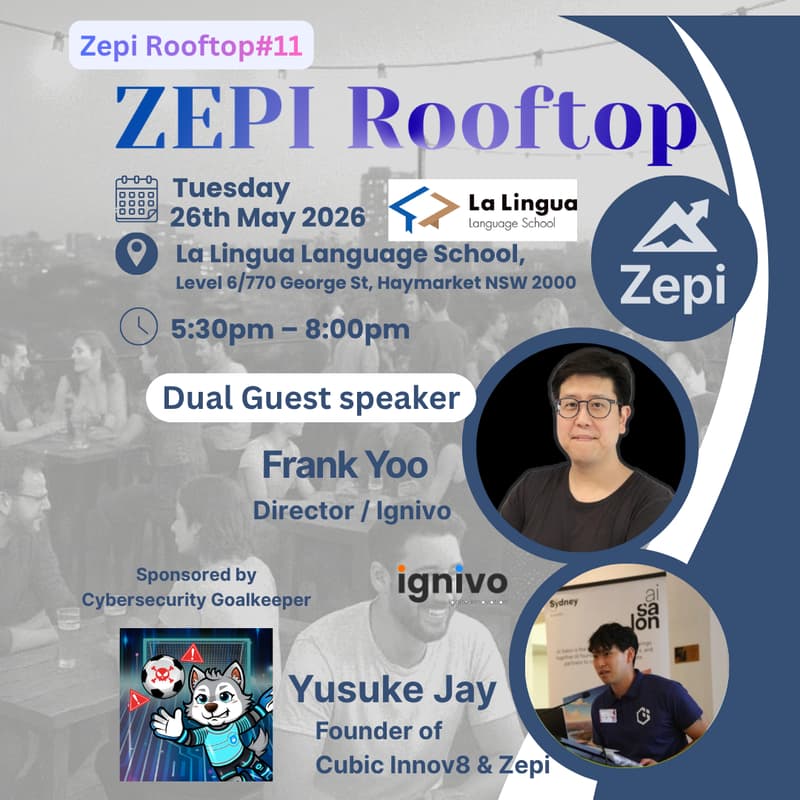

【Zepi Rooftop #11】🔐 Are You Already Hacked? Cyber Security in the AI Era
Read this before you scroll past.
Right now, somewhere on the dark web, there is a record with your email. Possibly your phone number. Possibly a password you still use. Possibly your home address.
You did not put it there. A company you trusted got breached. LinkedIn. Canva. Dropbox. Optus. Medibank. The list keeps growing.
Three real stories. None of them thought it would happen to them.
🔴 Sydney, 2022. Josie Duncan, 31, boarded a flight. Scammers used 30 seconds of her voice scraped from social media to clone it, called her dad mid-flight, and walked away with thousands of dollars before she landed.
🔴 Australia, 2022. The Optus breach exposed 9.5 million customers. 2.1 million had passport and licence details stolen. Linked fraud incidents so far: over 300,000. Those records are still circulating today.
🔴 Hong Kong, 2024. A finance employee at engineering firm Arup joined a video call with the "CFO" and colleagues. Every face was a deepfake. He wired 25 million USD across 15 transactions before anyone realised.
By the time most people notice, the damage is already in motion.
A login alert from a country you have never been to. A charge you did not make. A phishing email that knows your full name and employer. A parent calling in tears because "you" just asked them to send money.
This workshop is the easy way to find out where you stand.
We check your actual email against real breach databases, live, in front of the room. You see what is out there about you. Then we spend two hours fixing it. Tools installed. Passwords audited. VPN running. Habits locked in.
What you will leave with
A live Dark Web check on your own email and phone number (you will see the breaches with your name on them)
A working password manager configured on your device, with your existing passwords audited and the weak ones flagged
A working VPN installed and tested
A personal cyber hygiene score and a one-page list of what to fix this week
The browser extensions, 2FA setup, and Passkey configuration that actually move the needle
The night
Session 1: Why You Should Be Worried — The AI-Era Threat Landscape, Self-Assessment + Live Dark Web Demo
Frank Yoo (Ignivo) opens with what has actually changed now that attackers have AI in their toolkit. Phishing that sounds exactly like your CEO. Voice clones of your family asking for help. Automated credential stuffing at a scale humans cannot match. Frank then walks the room through a 5-question personal cyber security self-check so you know exactly where you stand. To close, Kaito runs a live Dark Web demo on attendee emails. You will watch your own data appear on screen. This is the moment that changes how you think about everything afterwards.
Session 2: Password Manager Hands-on
Live setup of Proton Pass on your device. Yusuke walks you through importing existing passwords, auditing the weak ones, and locking down your most critical accounts. By the end your passwords are in better shape than 90% of the people who walked in.
Session 3: VPN Hands-on
Frank Yoo runs a live VPN setup and covers the daily habits that compound. Browser extensions, 2FA, Passkeys, what to do when you get a suspicious email, what to never click on public Wi-Fi.
Who this is really for
If you are an individual: founders, IT and tech professionals, students, freelancers, anyone who uses email and a phone and has accounts at more than three places online. The personal stakes are higher than you think and the fix is cheaper than you think.
If you run a business or manage IT for one: this is where it gets serious. If your personal security posture is this exposed, your company's is worse. Most SMBs in Sydney are running on default settings, shared passwords, no endpoint monitoring, no idea what is happening on their network until something breaks.
Ignivo (our sponsor) runs ongoing managed security services for exactly this problem:
Security posture audit: a full assessment of where your company actually stands, what is exposed, what is one click away from disaster
Managed Security Services (MSSP): monthly endpoint management, network monitoring, threat detection, the boring infrastructure that stops the breach before it happens
AI security and identity: how to deploy AI tools at work without leaking your IP into someone else's training data
Come to the workshop, see your personal exposure, then talk to Frank about what your company looks like under the same lens. We will make warm intros where it makes sense.
Run sheet
17:30 Registration + refreshments
17:45 Opening
17:55 Session 1: Why You Should Be Worried — Threat landscape + self-assessment + Dark Web demo (Frank, Kaito)
18:25 Session 2: Password Manager hands-on (Yusuke)
18:55 Break
19:05 Session 3: VPN hands-on (Frank)
19:30 Q&A
19:45 Networking
20:00 Close
What to bring
Your laptop (essential, this is hands-on)
Mobile data or hotspot, do not rely on venue Wi-Fi
The email address you use for important accounts (banking, work, social) for the Dark Web check
Pre-created Proton Pass and Proton VPN accounts (free plan, takes 2 minutes)
Logistics
Date: Tuesday 26 May 2026, 17:30 to 20:00
Venue: Sydney Polytechnic Institute (full address on confirmation)
Language: English, with networking support in Japanese available
Capacity: 15 spots, capped to keep it hands-on
Sponsor: Ignivo (https://ignivo.io), catering and drinks included
Media partner: Cyber Security Goalkeeper, daily cyber security updates worth following:
English: @cybersecurity_goalkeeper
Follow before the event. Half the workshop value is staying current after you leave.
One last thing
If this got forwarded to you and you are still reading, that is your sign. The cost of finding out you were breached on a Tuesday night, in a room full of people who will help you fix it, is roughly zero. The cost of finding out at 2am because someone drained your account, or your company's, is not.
Lock in your spot.