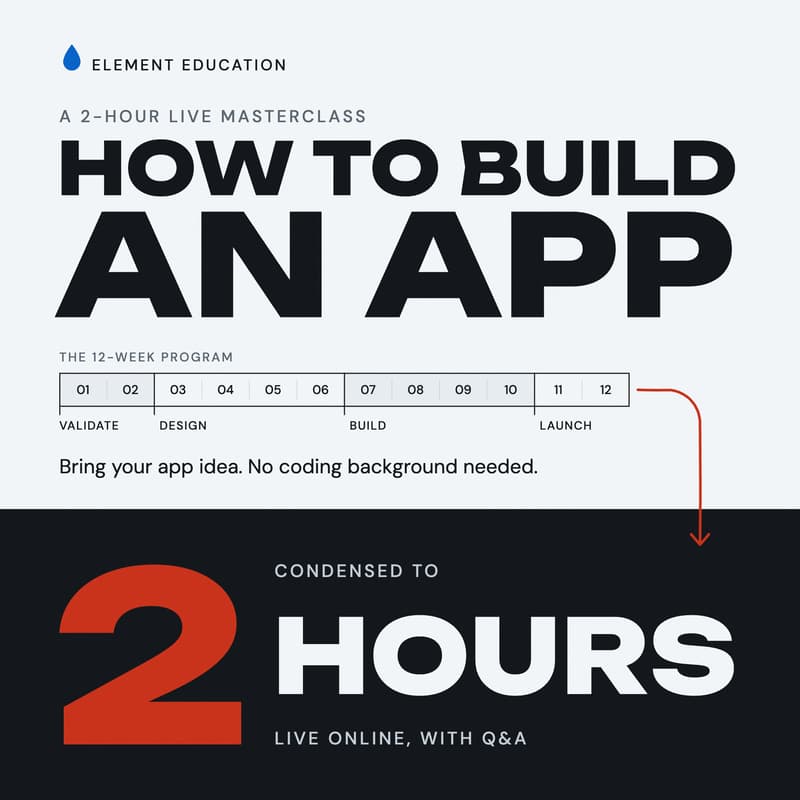
How to Build an App With AI Masterclass
Ship Your Own Product with AI: A Masterclass for UX Designers
You already know how to design a product. You can research a problem, map the flows, set up a design system and test a prototype with real users. Then the file goes to a developer and you wait, or it never gets built at all.
AI can now write most of the code, so the gap between a Figma file and a live app is much smaller than it used to be. What most designers are missing is the route: what to ask the AI for, in what order, and how to get from a prototype to something people can download.
That route is what this masterclass covers. I’ll walk you through the same path my 12-week Element Education program follows, from a rough idea to an app in the App Store. It’s the same four phases and the same tools, condensed into two live hours.
You don’t need to know how to code, and you don’t need to be a senior designer. If you’re still learning UX, this is for you too. I’ll explain each tool in plain English and show you where your design skills already give you a head start.
What we cover
Validate (weeks 1 and 2): turn your idea into a clear problem statement, check who else is already solving it, and cut your feature list down to a first version you can actually ship. This is familiar ground for designers, and AI makes it faster.
Design with AI (weeks 3 to 6): map your screens and user flows, set up a simple design system, design the core screens in Figma with AI, and test a clickable prototype with real people before you build anything. Most designers already have an edge in this phase.
Build (weeks 7 to 10): most designers have never done this part. You’ll set up your project with AI coding tools, get your first screen running, add accounts and a database, build the three to five features that define your app, and put it in front of beta testers.
Launch (weeks 11 and 12): submit to the App Store, put up a landing page, and plan how you’ll find your first users.
Live Q&A: bring your idea, your portfolio questions and anything else on your mind.
The tools
Claude and ChatGPT for planning and writing, Figma with AI plugins for design, Cursor and v0 for building, Supabase for user accounts and data, and Expo for turning it into a real iPhone and Android app (or Next.js if a web app suits your idea better). You probably know Figma already. For everything else, you’ll see what each tool is for and when to reach for it.
You’ll leave with
A map of the whole route, from problem statement to live app, with the deliverable that ends each of the twelve weeks
What each tool in the stack does, and where it fits next to the design work you already do
The points where app projects usually stall, and what gets them moving again
A clear first step for your own product
Who it’s for
You’re a UX or product designer who is tired of handing your work off and waiting for it to be built
You’re learning UX or moving into it from another field, and you want a portfolio piece people can actually download
You have a product idea of your own and the design skills to shape it, but no way to build it yet
You want to be the designer on your team who can take an idea all the way to launch
About your host
I’m Nick McInnis. I worked on superyacht IT systems before I moved into design, and I’ve spent the last eight years as a UX designer on more than 40 projects at more than 12 companies, from startups to enterprise. These days I design and build my own products with AI. I also run Element Education, a live, remote launch lab for people who have an app idea and no engineering background. I teach the 12-week program myself, and this masterclass is that program cut down to its essentials.