
If you can describe it, you can build it: An AI views webinar
Vibe coding for teamwork: the latest on AI views
Hosted by Justin Hales, Jeremy Olson, Emma Wyatt, and Ruggy Joesten from the Superhuman team
About the event
Your team’s tables may already contain the right data, but a standard table is not always the best way to understand that data, make decisions, or take action.
Justin Hales and Jeremy Olson from Superhuman product team deliver a live community webinar and roundtable exploring AI views, a new way to turn live Docs data into custom, collaborative experiences.
You will see how to describe the tool you need in plain language, let AI build it on top of a live table, refine it through conversation, and share it with your team. No separate coding environment, hosting, or authentication setup required.
Unlike a standalone vibe-coded prototype, an AI View stays connected to the underlying table. Changes flow in both directions, and multiple experiences can use the same source of truth without creating stale copies.
What you’ll learn
How to turn a Docs table into an interactive team tool
How AI views and the underlying data stay synchronized
How to add AI-powered actions inside a finished experience
How to create different interfaces for different teammates without duplicating data
How Docs permissions, authentication, and controlled data connections support secure sharing
How to start building and testing safely during open beta
Info on joining our open beta to use AI views yourself!
Live demos
Justin and Jeremy will walk through practical examples, including:
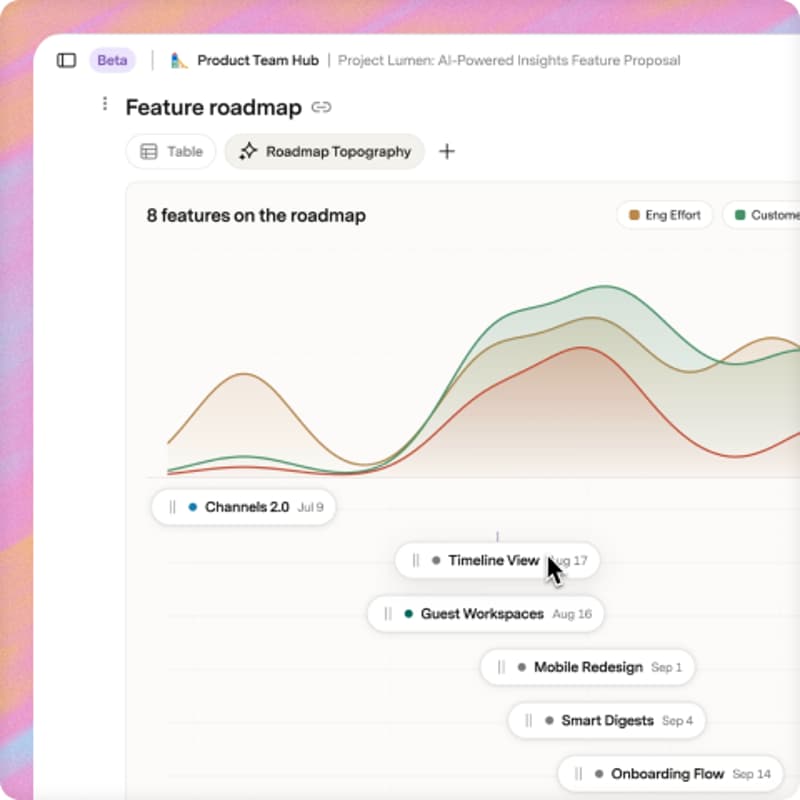
A roadmap that visualizes effort, customer value, and risk
A smart seating planner built from guest data and freeform preferences
An interactive workflow for reviewing and prioritizing customer feedback
A playful collaborative experience that shows the creative potential of AI views
You will also see the underlying table in action and learn how one source can support multiple role-specific experiences.
Who should attend
This session is designed for anyone who builds tools, trackers, workflows, or decision-making systems for a team, including:
Operations and general management teams
Product, engineering, and design teams
Sales and customer-facing teams
Marketing and community teams
Consultants, agencies, and advanced Docs makers
Curious non-technical builders with ideas they want to bring to life
Early AI views testers who want to see what has changed since the alpha
No coding experience is required.
Agenda
Welcome and open-beta context
Why AI views exists
Live product walkthrough and demos
Getting started and open-beta guidance
Community build challenge
Audience Q&A
The presentation will run for approximately 30 minutes, followed by 15 minutes of Q&A.
Speakers
Justin Hales
Justin will cover the practical positioning, target audience, open-beta context, and how to get started with AI views.
Jeremy Olson
Jeremy will explore the product vision, core mechanics, live demos, security model, and roadmap-aware Q&A.
Moderated by Ruggy Joesten and Emma Wyatt
Join the community build challenge
After the session, create an AI View for a real team workflow, refine it through conversation, and share what you built with the community.
Your examples, prompts, successes, and lessons learned will help grow the AI views community gallery and inspire what others build next.
Save your spot and come ready to describe, build, and share.