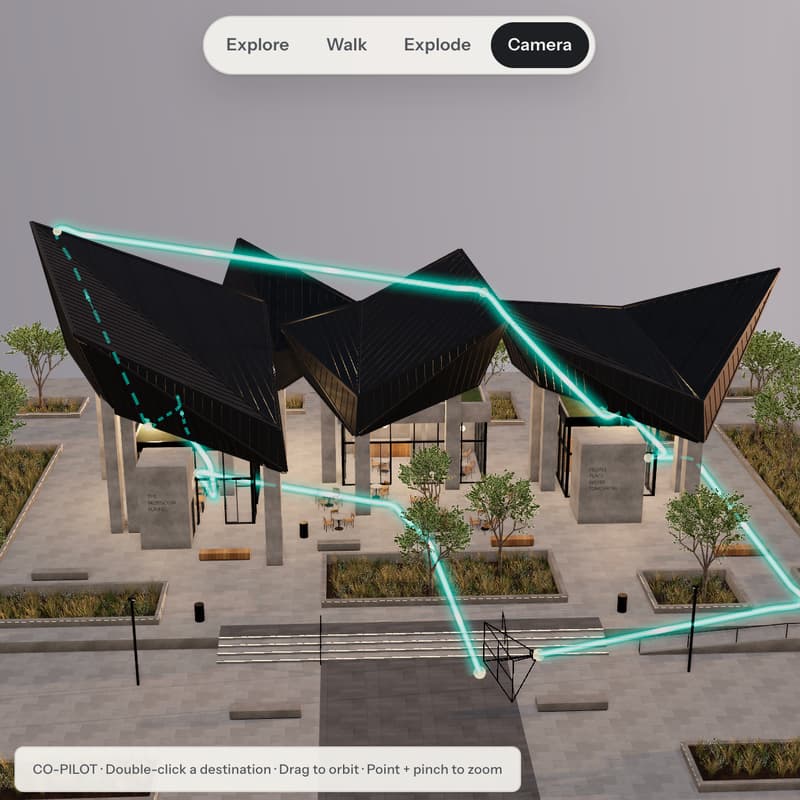

The Living Model: From 3D to Visualization, Motion & Interactive Presentation
This is a 3-hour live online workshop for architects and other design professionals.
Most AI in architecture stops at a still. A render, a short clip, a slide deck. The model stays a static object.
It doesn't have to. One project can now move from brief and site to interactive 3D, controlled visuals, motion and a client-ready interactive presentation, with the architect directing every stage and the model writing the code.
The Living Model follows a single project through that workflow: UNDERSTAND → DEFINE → MODEL → VISUALIZE → SEQUENCE → MOVE → PRESENT.
The tools will change. The workflow transfers.
🔥 Agenda
[Part 1] Understand & Define
The finished experience first, then how it was built
AI reads before it draws: brief, site, drawings and references become a Project Intelligence Brief
From context to design language: Cue → Rule → Form
A Visual Direction Brief that feeds the 3D stage
[Part 2] Model, Connect & Visualize
A deep-dive of GPT-6 Astra and Opus 5.5, two most advanced and relevant LLMs.
AI native 3D model building using Blender headless: scene setup, camera, materials, lighting and interactive experience
Web-based interactive 3D models using Three.js and other open source programs
One short live glimpse of AI inside Revit or Rhino via MCP
Visual direction: the few views worth producing, and what each must say
The design workflow, saved as a reusable agent Skills
[Part 3] Sequence, Move & Present
Map the spatial moments before animating anything: from Context and Approach to Main Space and Closing View
Code/model motion vs generative motion: geometry and camera control vs life and atmosphere
Build your project into a sharable website or an interactive experience.
🧰 Tools & Systems Covered
Blender headless, Three.js, Claude, ChatGPT, Claude Skills, MCP (Revit or Rhino), HTML, Claude Artifacts
AI models: Opus 5.5, GPT-6 Astra, Sol, Fable 5.1, GPT-Image-2.5, Seedance 2.5, Gemini Omni Flash 1.1
🎓 What You Will Receive
🎁 Full recording of the session
🎁 The agent Skills ready to reuse on your own projects
FAQ
Q: Do I need to code?
A: No. You direct, review and refine. The model writes the code.
Q: Do I need Revit or Rhino installed?
A: No. The MCP segment is one short live example, not an installation tutorial.
Q: Claude or ChatGPT?
A: Either. The workflow runs in both, and the reusable pieces can be saved as a Claude Skill or a ChatGPT agent.
The detailed agenda may evolve with the latest AI advancements. The core workflow remains the focus.
🧠 About the Hosts
June Chow
Architect · Educator · AI Strategist
June Chow works at the intersection of architectural practice and generative intelligence. She has delivered AI-focused lectures and workshops for professional institutions, universities, and international design audiences, and serves as a jury member for global architecture and AI awards.
Her work focuses on building structured AI design systems — integrating system prompting, spatial philosophy, and controlled visual workflows into real-world architectural processes. June guides architects in moving beyond isolated experimentation toward disciplined, repeatable AI-driven design environments.
Tianyu Xu
Generative AI Educator · LinkedIn Top Voice
Tianyu has 180,000+ followers across social media and regularly share practical AI insights on LinkedIn. Tianyu believes in AI’s power to augment human capabilities. With a decade of digital marketing experience prior to generative AI, Tianyu combines creativity and data-driven insights in prompt engineering and AI tools. He is the coauthor of "Will ChatGPT Take My Job: Winning Strategies for Managers."