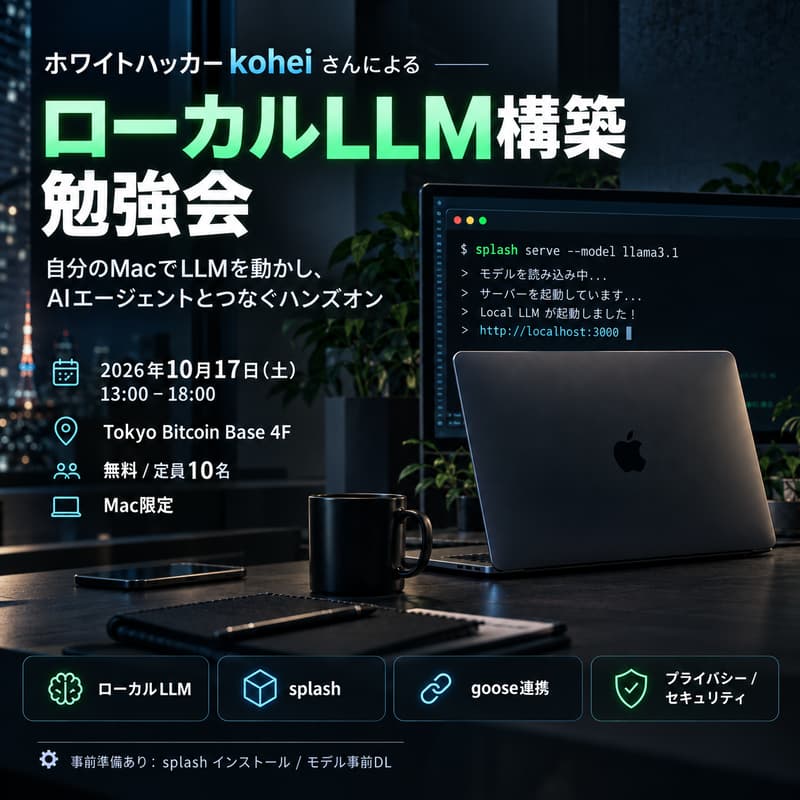

ローカルLLM構築 勉強会 / Local LLM Building Workshop with Red-Hat Hacker kohei
english info below
自分の Mac の上で LLM を動かし、AI エージェントとつないで対話できるところまで、一緒に手を動かして構築する勉強会です。
クラウドにデータを送らずに使える「ローカルLLM」は、プライバシーやセキュリティの観点で注目されています。
講師は日本ビットコイン産業株式会社のレッドチーム:ホワイトハッカーの kohei さんです。
今の手元の環境で動かせるベターなモデルの選び方から、ハーネス(エージェント環境)の構築まで、ハンズオン形式で進めます。
このイベントで学べること
ローカルLLMとクラウドLLMの違い・使い分け
splash を使ったローカルLLMのダウンロードとサーバー起動
ローカルモデルを API として起動し、goose と連携させる方法
goose 経由でモデルと対話し、手元のプロジェクトやファイルを読み込ませる方法
ローカルLLMを使う際のセキュリティ・プライバシー上の注意点
ゴール
自分の PC 上で LLM を起動し、ハーネスを構築してチャットできる状態になること。
こんな方におすすめ
ローカルLLM 初心者の方
エンジニアの方
AI に興味がある方
セキュリティ・プライバシーに関心がある方
高スペックな Mac をお持ちで、その性能を活かしたい方
必要な前提知識
ターミナルでのコマンド操作に抵抗がない方。プログラミング経験は不要です。
参加条件(必要なPC)
Mac のみ対応(Windows / Linux 不可)
最低:Apple Silicon M3 以上、メモリ 36GB 以上
推奨:Apple Silicon M4 以上、メモリ 48GB 以上
Intel Mac では動作しません
事前準備(必ずお願いします)
splash のインストール
モデルの事前ダウンロード
splash serve --model unsloth/Qwen3.8-27B-GGUF:UD-Q4_K_M
モデルは容量が大きく、当日会場で全員がダウンロードすると回線が混雑するため、事前ダウンロードにご協力ください。手順の詳細 URL は参加者の方に別途ご案内します。
持ち物
上記条件を満たす Mac(ノートPC)
電源アダプター
タイムテーブル(予定)
12:45 受付開始
13:00 オープニング・kohei さん自己紹介
13:15 LT:LLM / ローカルLLM の基礎、ローカルで使うメリット、クラウドとの比較
14:00 ハンズオン①:環境確認・ローカルLLM起動
15:00 休憩
15:15 ハンズオン②:API 起動・goose 連携・対話
16:30 発展編:手元のプロジェクト・ファイルを読み込ませる
17:00 セキュリティ / プライバシーの注意点・Q&A
17:30 交流会
18:00 終了
注意事項
業務用 PC でご利用の場合、エージェントが不要な情報まで読み込む可能性があります。会社のルールをご確認のうえご参加ください。
当日は講師の kohei さん、サポートの abe さんが PC トラブルに対応します。
主催:日本ビットコイン産業株式会社 勉強会
お問い合わせ:ichinaka / kohei
登録時の質問(Registration Questions に追加推奨)
お使いの Mac のチップとメモリ(例:M3 Pro / 36GB)
splash のインストールとモデルの事前ダウンロードを当日までに済ませられますか?(はい/いいえ)
当日試したいことや、読み込ませたいプロジェクトがあれば教えてください(任意)
Event Description
A hands-on workshop where you'll run an LLM on your own Mac, connect it to an AI agent, and chat with it, building everything step by step together.
Local LLMs let you use AI without sending your data to the cloud, which makes them increasingly attractive from a privacy and security perspective. Your instructor is kohei, a white-hat hacker. He'll guide you from choosing the best model your current machine can handle to setting up a harness (agent environment), all in a hands-on format.
What You'll Learn
The differences between local and cloud LLMs, and when to use each
How to download and serve a local LLM with splash
How to run a local model as an API and connect it to goose
How to chat with the model through goose and have it read your own projects and files
Security and privacy considerations when using local LLMs
Goal
Leave with an LLM running on your own machine, connected to a harness you can chat with.
Who This Is For
LLM beginners
Engineers
Anyone interested in AI
Anyone interested in security and privacy
Owners of high-spec Macs who want to put that power to use
Prerequisites
You should be comfortable running commands in the terminal. No programming experience required.
Requirements (Your Computer)
Mac only (Windows / Linux not supported)
Minimum: Apple Silicon M3 or later, 36GB+ memory
Recommended: Apple Silicon M4 or later, 48GB+ memory
Intel Macs will not work
Before the Event (Required)
Install splash
Download the model in advance:
splash serve --model unsloth/Qwen3.8-27B-GGUF:UD-Q4_K_M
The model is large, and if everyone downloads it on-site the venue network will get congested. Please download it beforehand. Detailed setup instructions will be shared with registered participants.
What to Bring
A Mac (laptop) that meets the requirements above
Your power adapter
Schedule (Tentative)
12:45 Doors open / Check-in
13:00 Opening & introduction by kohei
13:15 Talk: LLM / local LLM basics, benefits of running locally, comparison with cloud LLMs
14:00 Hands-on 1: Environment check & launching your local LLM
15:00 Break
15:15 Hands-on 2: Running as an API, connecting to goose, chatting
16:30 Advanced: Having the model read your own projects and files
17:00 Security / privacy considerations & Q&A
17:30 Networking
18:00 Close
Notes
If you're using a work computer, be aware that the agent may read information it doesn't need. Please check your company's policies before attending.
kohei and abe will be on hand to help with any PC trouble during the event.
Organizer: Nichibi Study Group (日ビ勉強会)
Contact: ichinaka / kohei
Registration Questions
Which Mac chip and memory do you have? (e.g., M3 Pro / 36GB)
Will you be able to install splash and download the model before the event? (Yes / No)
Anything you'd like to try, or a project you'd like the model to read? (Optional)